

Skip to content
View in the app

A better way to browse. Learn more.

Zayed.Solutions

A full-screen app on your home screen with push notifications, badges and more.

To install this app on iOS and iPadOS
  1. Tap the Share icon in Safari
  2. Scroll the menu and tap Add to Home Screen.
  3. Tap Add in the top-right corner.
To install this app on Android
  1. Tap the 3-dot menu (⋮) in the top-right corner of the browser.
  2. Tap Add to Home screen or Install app.
  3. Confirm by tapping Install.

External Links Rich Embed 1.4.16

$25

(1 review)

3 Screenshots

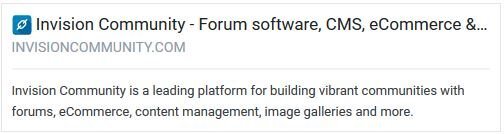
This plugin makes use of the Parser class to make a preview for the posted external URL inside the editor.

When an external link is pasted into the editor, it is automatically expanded into a preview of the content, usually with an accompanying image, allowing users to click through to that content if they are interested.

Plugin features:

  • Supports a variety of external URL contents (Media, news, communities... etc.)
  • Option for Simple/Rich embeds.
  • Control what content to display (Title, URL, Host, Favicon, Description, Image)
  • Option to exclude URLs from being retrieved.
  • Control which user groups that can use it.

Display options:

  • Show/Hide wrapper.
  • Width of wrapper.
  • Image height.
  • Title truncation.
  • Description truncation.

IMPORTANT NOTE BY DEVELOPER: This plugin doesn't support Amazon products embed

Simple Mode Demo:

Rich Mode Demo:


User Feedback

You may only provide a review once you have downloaded the file.


Hello.

Will there be a External Links Rich Embed module for the 5th version?

Thank you.

Account

Navigation

Search

Search

Configure browser push notifications

Chrome (Android)
  1. Tap the lock icon next to the address bar.
  2. Tap Permissions → Notifications.
  3. Adjust your preference.
Chrome (Desktop)
  1. Click the padlock icon in the address bar.
  2. Select Site settings.
  3. Find Notifications and adjust your preference.