





Skip to content
View in the app

A better way to browse. Learn more.

Zayed.Solutions

A full-screen app on your home screen with push notifications, badges and more.

To install this app on iOS and iPadOS
  1. Tap the Share icon in Safari
  2. Scroll the menu and tap Add to Home Screen.
  3. Tap Add in the top-right corner.
To install this app on Android
  1. Tap the 3-dot menu (⋮) in the top-right corner of the browser.
  2. Tap Add to Home screen or Install app.
  3. Confirm by tapping Install.

A Zayed

Administrators
  • Joined

Files posted by A Zayed

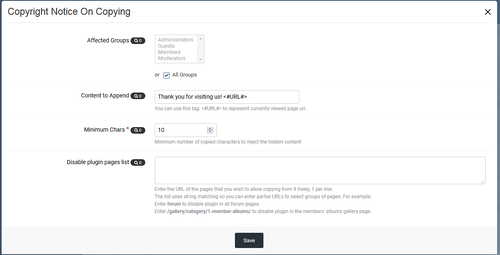
  1. Simply, This plugin will inject text into any post copied from your site (by "Ctrl+C" or "Right Clicking then Copy")...
    When I user copies (Ctrl+C) this content:
    "lorem ipsum dolor sit amet" When the user paste (CTRL+V), the content will be (for example):
    "lorem ipsum dolor sit amet" Read more here : Some URL This's very useful to get a backlink to your site...
    • $20
    • 2 Purchases
    • 1 Marketplace
    Submitted
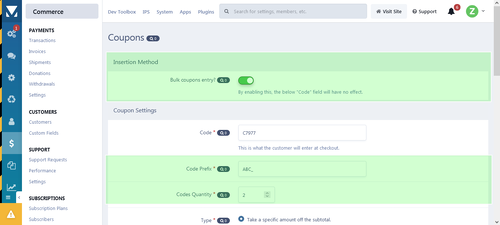
  2. This application allows commerce admins to auto generate coupon codes.
    Also, Allows admin to export all coupons into a .txt file.
    Admin just selects insertion method, type coupon code prefix and decide the required quantity, then hit save!
    • $15
    • 3 Purchases
    • 9 Marketplace
    Submitted

Account

Navigation

Search

Search

Configure browser push notifications

Chrome (Android)
  1. Tap the lock icon next to the address bar.
  2. Tap Permissions → Notifications.
  3. Adjust your preference.
Chrome (Desktop)
  1. Click the padlock icon in the address bar.
  2. Select Site settings.
  3. Find Notifications and adjust your preference.